Welcome to Workflow Capture to post your advertisement to multiple sites:
- myrealproperty.online
- contract2u.com
- findwhere.info
- agentmy.online
- ejenharta.com
- sinjunproperties.com
Optional
| Posting to 5 Websites | Posting to 6 Websites & Selective Site |
| Blog Posts | Standard Advertisement Posts |
How to post?
First, prepare a FLYER generated by ChatGPT consisting of the key photographs and information of the property, together with information of –
- Name of REN/PEA/REA;
- REN/PEA/REA registration number;
- REN/PEA/REA mobile contact number;
- Firm Name;
- Firm registration number;
- Firm desk telephone number.
See example below:
With courtesy from Ms Sally Chong of Sinjun Properties.
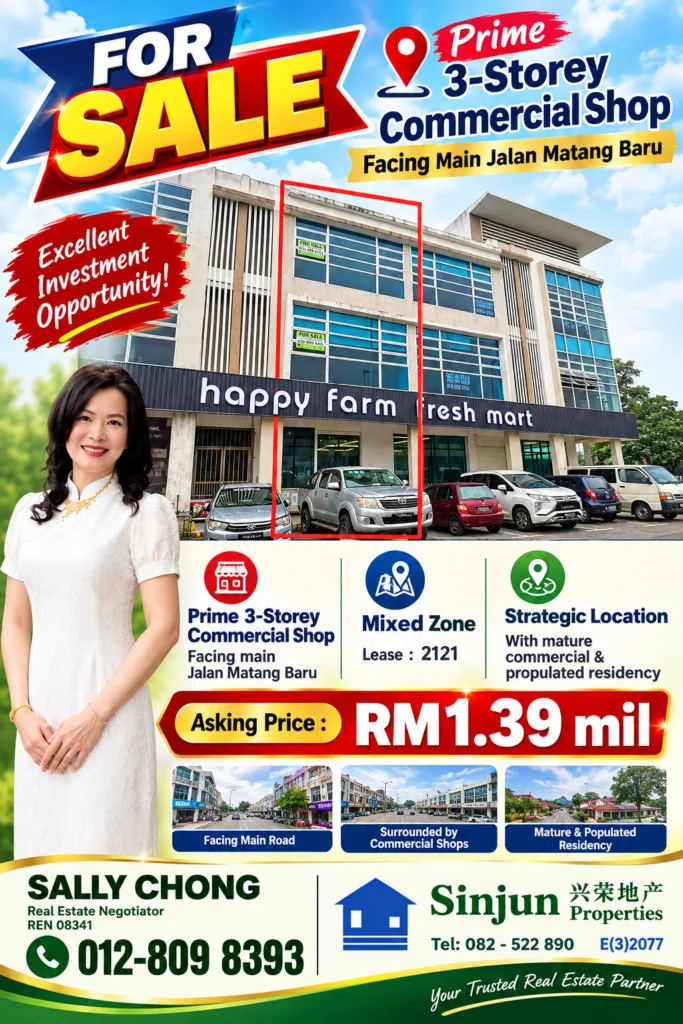
- Attach this FLYER of your advertisement inside the Workflow Capture.
- Click the checkbox if you prefer to add your advertisement to specific site: justland.info (for only land), staymyroom.com (for only room) and unsold.my (for only unsold units).
Click submit.
You need to wait for a few minutes to be able to see multiple publishing of your advertisement.
Thank you.